


Step 1
Start with one tap
Run the full check from the app or the home-screen widget. If something specific is wrong, pick it while the measurement continues.
Slow internet? Wi-Fi dropping? Calls freezing? Diagnostix360 checks every step from your phone to the internet — your Wi-Fi, router, provider and DNS — in about a minute, then tells you what to try first.
Pick what you notice. You’ll see the usual causes, one thing to try right now, and what the app measures to confirm it.
Usual causes
Try this first
Test once right next to the router, then again in the slow room. If it is much better near the router, Wi-Fi coverage is probably part of the problem — check again to confirm the pattern.
What Diagnostix360 checks
Wi-Fi signal, phone → router delay, router → internet, DNS, and speed if you choose it.
Usual causes
Try this first
Pause big downloads and use the 5 GHz Wi-Fi if your router has it. Then test at the time the buffering happens.
What Diagnostix360 checks
Download and upload speed, delay under load, and how crowded your Wi-Fi channel is.
Usual causes
Try this first
Stay close to the router during the call and stop uploads (backups, photo sync). If it keeps happening, run Live Monitoring during your next call — it measures the network, never the call itself.
What Diagnostix360 checks
Jitter, packet loss and delay under load. Live Monitoring records up to 90 minutes, with the time of every drop.
Usual causes
Try this first
Play near the router on 5 GHz and pause downloads on other devices.
What Diagnostix360 checks
Server ping, jitter, delay under load and international routes.
Usual causes
Try this first
Check if other devices are online. If mobile data works and Wi-Fi doesn’t, the cause is most likely at home: restart the router once, then check again.
What Diagnostix360 checks
Each step on its own — phone, router, internet, DNS — so you can see where it stops.
Usual causes
Try this first
Run one check at a good time and one at a bad time, and compare the two reports.
What Diagnostix360 checks
Saved reports to compare, and Live Monitoring that timestamps every slowdown.
Tap once, describe the problem if you like while it measures, then follow the suggested next step. The speed test is optional.
Run the full check from the app or the home-screen widget. If something specific is wrong, pick it while the measurement continues.
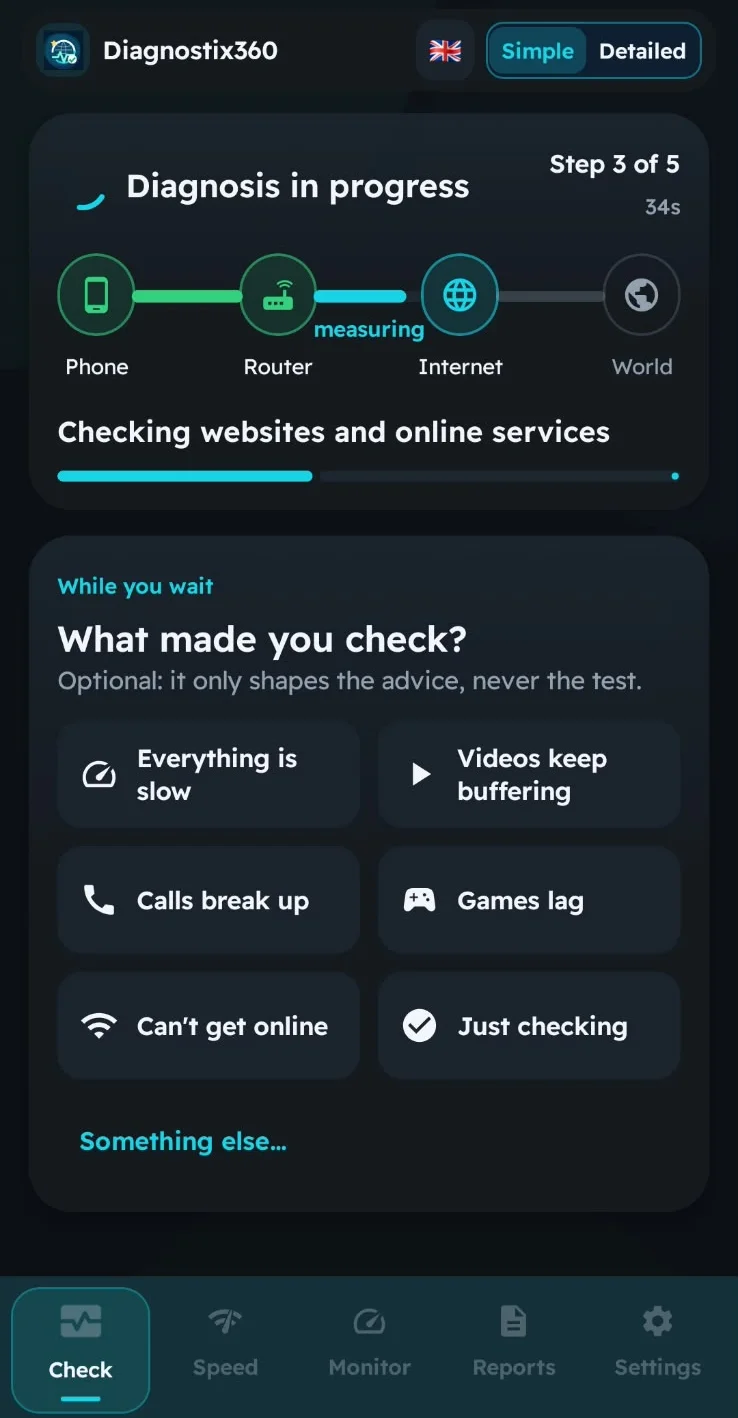
Phone, router, provider, DNS and common online services are tested in turn. A speed measurement can run alongside if you choose it.

Try the suggested step and re-check. Ask for a reminder to test again later, or send a one-page report if you still need help.
Real screens from the app. Network names and addresses removed.


A quick check catches what is happening now. Live Monitoring keeps measuring for up to 90 minutes, keeps going when you switch between Wi-Fi and mobile data, and records every drop with its time — so the problem that disappears when the technician arrives finally has evidence.
Three report types, each in English, French, Spanish or Arabic. The English samples use fictional values. The French and Arabic ones are real reports from a test on our own network, with network names, IP addresses, provider and location removed.
A clear verdict, speed where measured, the connection path and simple next steps.

The one to send your provider: scoring evidence, Wi-Fi and path measurements, confidence and the limits of the test.

Session length, availability, jitter, packet loss and a minute-by-minute quality timeline.
Rated 4.8 out of 5 on Google Play, October 2026.
“Nice application. Professional report. My internet score is 95/100 !!”Google Play review · August 2026
“Very useful data”Google Play review · October 2026
“Good app”Google Play review · September 2026
Anonymous results from Diagnostix360 users who turned on diagnostic data sharing, 5 September to 26 October 2026.
Most common findings: the provider’s path (14%), DNS (12%), Wi-Fi (7%), mobile signal (5%), router (4%). Speed figures: 472 tests from 16 October. Groups of fewer than 20 installations are never published.
Yes. It is free, with no account and no ads.
Android 8.0 or newer. An iPhone version is not available yet.
The speed test is optional, and it is what uses data: up to 170 MiB for the full test (about 25 seconds) and up to 55 MiB for the quick test (about 12 seconds). Before a test on mobile data, the app shows this budget so you can choose.
Android only lets apps read Wi-Fi details such as the network name and signal when they have location permission. Depending on your privacy settings, a technical report can include a city-level location; a report only leaves your phone if you share it.
It shows where along the path the problem appears — Wi-Fi, router, provider or DNS — during the time it measured. It is a diagnostic aid, not a certified measurement, but it gives your provider facts instead of a feeling.
A longer test for problems that come and go. It keeps measuring for up to 90 minutes, carries on when you move between Wi-Fi and mobile data, and records each drop with its time.
The app and its reports are in English, French, Spanish and Arabic.
Find out which apps are using your data — even overnight, with the screen off — before your bundle runs out.

No account and no ads. Checks run on your phone and work without any optional sharing. Diagnostic sharing and usage analytics are separate choices you can change at any time, and you decide whether a report leaves your phone. A speed test connects to the test server you start it with.
Try Diagnostix360 on real support tickets with a free 30-day pilot, and see the reports your agents would receive.
Test in the room where it goes wrong, try the first suggestion, and keep the report in case you still need help.
Using an iPhone? Diagnostix360 is on Android for now. Get notified when iOS is available.